20 March 2014
Editor:
-
- Juan Carlos Cruellas, UPC cruellas@ac.upc.edu
Contents
1. Grouping test cases and folders naming conventions
2. Downloading material
1. Grouping test cases and folders naming conventions
This clause provides details on how the different test cases have been grouped. This is relevant because it defines the folders structure where participants will have to include their ASiC containers and verification reports, as shown in Downloading material clause.
For both generation and crosss-verification and only-verification types of tests, the following criteria are used for defining different tests groups:
-
Type of ASiC container. There will be groups testing ASiC Simple Form (identified by ASiC-S) and groups testing ASiC Extended Form (ASiC-E).
-
What is tested. This may be: a combined Container Structure (CS) and a Syntactical Conformance (SC) check whose acronym is CSSC, or the Signature / Time-stamp token, whose acronym is STV.
-
The type of the signatures within the container, namely: XAdES (X), CAdES (C), or time-stamp (T). Codes X and C may be followed for additional codes:
- Code BpYY identifies a set of checks for Baseline Profile signatures, being YY the identifier of the corresponding conformance level as defined in the corresponding specification.
- Code following the pattern YY (no Bp in the code) identifies a set of checks for Core Specification signatures, being YY the identifier of the corresponding signature form as defined in the corresponding specification.
-
The PKI scenario.
The names of the folders that will contain the different test cases groups will follow certain patterns, derived from the criteria above.
-
For the groups corresponding to the generation and cross-verirification tests, the pattern will be ASiC-{ASIC-FORM}_{WHAT-IS-TESTED}_{SIG-TST-TYPE}.{PKI-SCENARIO}, where:
-
{ASIC-FORM} stands for ASiC Form, which may be S for Simple Form or E for Extended Form.
-
{WHAT-IS-TESTED} stands for what is tested, which may be may be CS when it is the Container, SC when it is the Syntax, and STV when it is the signature(s) and/or the time-stamp token(s). Combinations are also allowed for test cases that include tests on several aspects (test cases testing container and syntax would result in CSSC, for instance).
-
{SIG-TST-TYPE} stands for the type of signatures or time-stamp tokens are included within the ASiC container for being validated, which may be X when signatures are XAdES, C when signatures are CAdES, or T when there are time-stamp tokens. As indicated before, X and C may be followed by additional codes (BpYY or YY).
-
{PKI-SCENARIO} stands for the PKI scenario, which may be SCOK or SCUN. See cryptographyc material page for details on the different PKI scenarios.
-
For the groups corresponding to the only-verirification tests, the pattern will be ASiC-{ASIC-FORM}_{WHAT-IS-TESTED}_{SIG-TST-TYPE}N.{PKI-SCENARIO}, where the added N stands for "Negative" (for instance ASiC-S_STV_X-XN.SCOK).
2. Downloading material
The figure below shows two participants interacting with the portal for downloading the material present in the portal and locally performing the Plugtests.
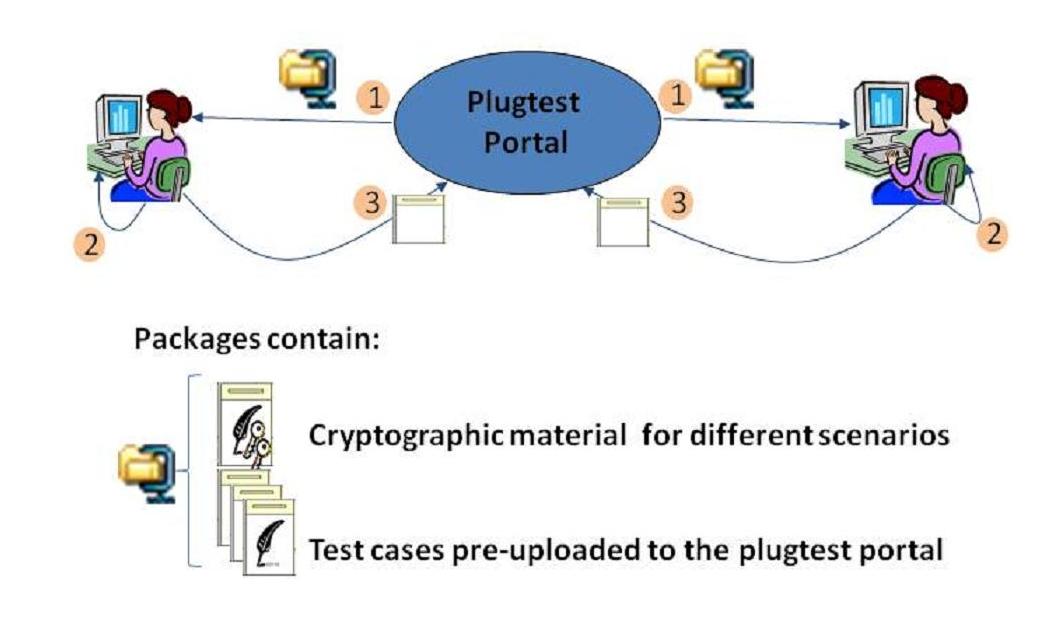
Each participant:
 downloads the initial package containing cryptographic material, pre-generated ASiC containers corresponding to the only-verification test cases, and the xml files specifying the different test-cases.
 locally runs the corresponding testcases with the suitable cryptographic material and the set of ASiC containers included in this initial package locally on their equipments and with their tools.
 uploads the results to the plugtest portal.
The figure below shows the contents of the ASiC initial package to be downloaded by participants for starting the Plugtests.

When the Plugtests participants extract the contents of the initial package, they will find in their local computers the folders structure represented in the figure above. Below follows the description of their contents:
- Folder CryptographicMaterial. As its name indicates this folder contains pre-generated cryptographic material for conducting the plugtest (CA and TSA certificates). It conains one subfolder, corresponding to the SCOK scenario. For further details on the material, please refer to: cryptographic material page.
- Folder Data. This folder contains a number of files required for conducting the test cases.
- Folders ASiC-E_CSSC_C.SCOK, ASiC-E_CSSC_X.SCOK, ASiC-E_CSSC_T.SCOK and the rest of folders not including negative test cases. These folders contain the material related to the test cases. Each folder is devoted to contain all the material managed for one group of test cases. Within each folder participants will find the following contents
- Folder TestDefinitions. Participants will find in this folder a number of XML files. Each file contains a XML document providing details on how to generate the ASiC container corresponding to the test case specified by this file. The reference for the testcases specification is the testcases document. These files provide supporting information for processors that could understand the language specified PAdES. Please note that TOOLS FROM PARTICIPANTS ARE NOT REQUIRED AT ALL TO PROCESS THESE FILES.
- A number of folders, each with the acronym identifying each participant (in the figure above these appear as [PARTICIPANT-1] to [PARTICIPANT-N] as at the moment of writing this document these acronyms where unknown). These folders are intended to exchange signatures and verification reports generated by each participant.
- Folders devoted to negative test cases. These folders contain the only-verification test cases. The contents of these folders are similar to the ones mentioned above except by certain differences:
- Folder ETSI. Participants will find in this folder a the ASiC containers corresponding to the only-verification tests. Additionally, they may find certain cryptographic material required for verifying the signatures.
- Each participant has to include ONLY VERIFICATION REPORTS in the folder whose name is the acronym identifying that participant, as PARTICIPANTS ARE NOT REQUESTED TO GENERATE THE INVALID ASiC CONTAINERS CORRESPONDING TO THESE TEST CASES.
Once the participants have extracted all the information present in the package in their computers, they may start conducting the plugtest. Typically, participants will go through some or all the steps detailed below:
- Verify ASiC containers present in the downloaded package and upload verification reports to the portal.
- Generate ASiC containers for generation and cross-verification test cases, accomplishing what it is specified in the testcase document, and upload them so that other participants may in turn verify for checking interoperability between tools.
- Download and verify ASiC containers generated by other participants and upload verification reports to the portal.
Next sections provide details on how this will be accomplished.